ip
Danny Chatbot User Guide
Danny is a versatile chatbot for managing your daily tasks. It is a cute cat that tries its best to help you create, mark, delete and tag your tasks. It might not be the world’s best chatbot, but it is in contention for the world’s cutest chatbot.
Quick Start
-
Ensure you have Java
17or above installed in your Computer. -
Download the latest
.jarfile from here. -
Copy the file to the folder you want to use as the home folder for your chatbot.
-
Open a command terminal,
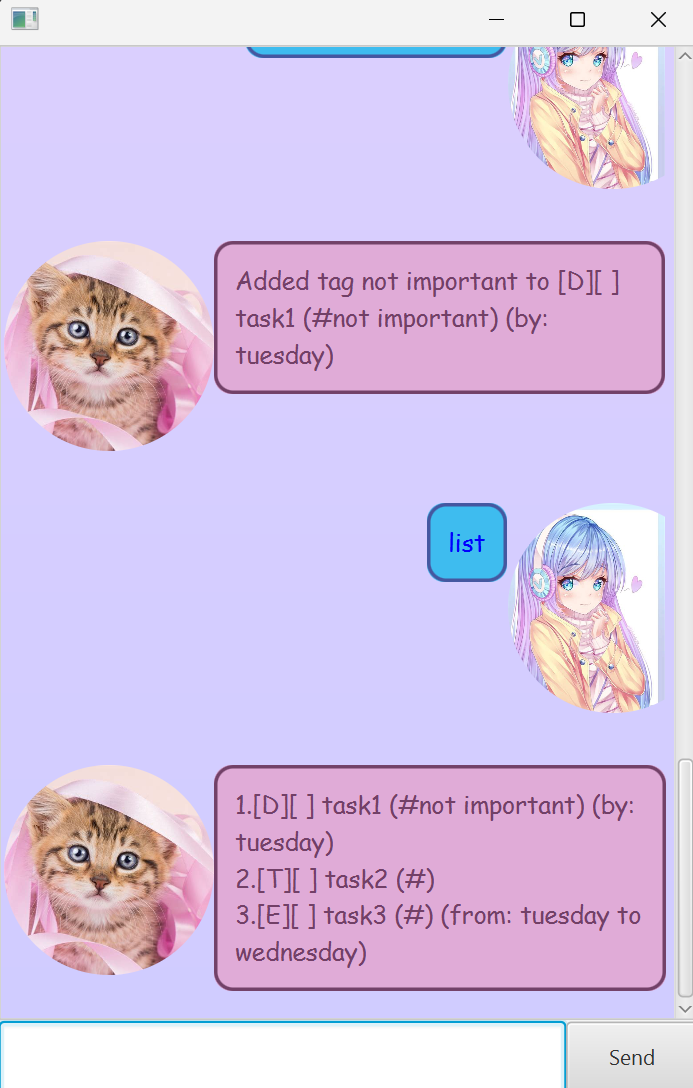
cdinto the folder you put the jar file in, and use thejava -jar danny.jarcommand to run the application.A GUI similar to the below should appear in a few seconds.
-
Type the command in the command box and press Enter to execute it. e.g. typing
listand pressing Enter will open the list menu. Some example commands you can try:-
list: Lists all contacts. -
delete 3: Deletes the 3rd task shown in the current list. -
bye: Exits the app.
-
-
Refer to the Features below for details of each command.
Features
- Note: Words in
UPPER_CASEare the parameters to be supplied by the user. - Upper casing or lower casing does not matter for commands
List
Shows list of all current tasks
Format: list
Todo
Adds a ToDo to the task list, a task with a name.
Format: todo TASK_NAME
Examples:
todo task 1
todo play games
Deadline
Adds a deadline to the task list, a task with a name and deadline date.
Format: deadline TASK_NAME /by DEADLINE_DATE
- Note: All dates needs to be in YYYY-MM-DD format, otherwise it will be stored as a string
Event
Adds an Event to the task list, a task with a name, start date and end date.
Format: event TASK_NAME /from START_DATE /to END_DATE
- START_DATE and END_DATE needs to be in YYYY-MM-DD format, otherwise it will be stored as a string
Delete
Deletes a task from the task list based on list index
Format: delete INDEX
- INDEX is the index of the task to delete. Must be a positive integer (e.g., 1, 2, 3, …).
- If INDEX does not exist within range of task list, error will be shown.
- INDEX is 1-based indexing
Example:
delete 2
Mark
Marks a task as completed based on list index
Format: mark INDEX
- INDEX is the index of the task to delete. Must be a positive integer (e.g., 1, 2, 3, …).
- INDEX needs to exist within range of task list, otherwise an error will be shown.
Unmark
Marks a task as not completed based on list index
Format: unmark INDEX
- INDEX is the index of the task to delete. Must be a positive integer (e.g., 1, 2, 3, …).
- INDEX needs to exist within range of task list, otherwise an error will be shown.
Tag
Tags a task with a hashtag(#)
Format: tag INDEX DESCRIPTION
- INDEX is the index of the task to delete. Must be a positive integer (e.g., 1, 2, 3, …).
- INDEX needs to exist within range of task list, otherwise an error will be shown.
Example:
tag 1 cannot be done
Find
Finds the appropriate task inside the tasklist that has the input as a substring of its description.
Format: find TASK_NAME
Example:
find task1
Known Issues
- UI Issues: If you expand the window, UI will be messed up.
Summary
| Action | Format | Examples |
|---|---|---|
| List all tasks | list |
list |
| Add a ToDo | todo TASK_DESCRIPTION |
todo eat some cake |
| Add a Deadline | deadline TASK_DESCRIPTION /by DEADLINE_DATE |
deadline finish project /by 2024-12-31 |
| Add an Event | event TASK_DESCRIPTION /from START_DATE /to END_DATE |
event birthday party /from 2024-11-01 /to 2024-11-01 |
| Delete a Task | delete INDEX |
delete 2 |
| Mark a Task as Done | mark INDEX |
mark 3 |
| Unmark a Task | unmark INDEX |
unmark 3 |
| Tag a Task | Tag INDEX DESCRIPTION |
update 1 Eat dinner |
| Find a Task | find TASK_DESCRIPTION |
find eat |